
Givebacks
Givebacks, Inc.Shopping
3.548.00 Reviews
- Version
- 3.6.7
- Installs
- 100.00K
- Age Rating
- Everyone
Screenshots
Our Review of Givebacks
 Analysis by Appyee
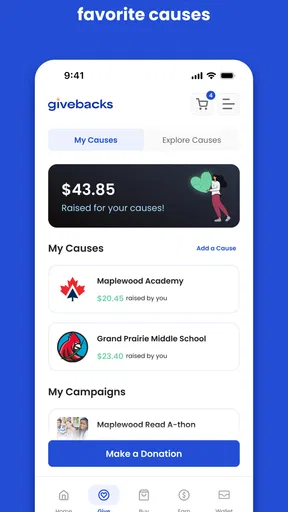
Givebacks is a free shopping app from Givebacks, Inc. with a simple purpose: help families support a child’s school while making everyday purchases. I approached it less like a traditional shopping marketplace and more like a participation tool that sits between household spending and school fundraising. That distinction matters, because its value depends on whether the stores, offers, and school connection available to you fit your normal routine.
The app has a 3.5 average from around 118 ratings, with roughly 48 written reviews, and it has passed 100K installs. Those figures suggest a real user base, but also a mixed experience rather than universal approval. I found that the most important question is not whether Givebacks looks polished at first glance; it is whether the setup feels clear enough for a parent to complete without guessing what happens next.
Where the Givebacks experience can stall
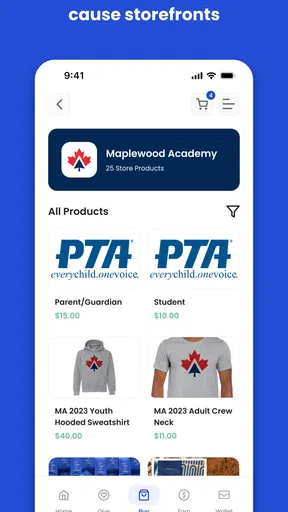
The first point of friction is usually expectation. Someone opening a shopping app may expect to browse products, compare prices, and check out entirely inside the app. Givebacks is better understood as a way to connect eligible shopping activity with school support. If you treat it like a general-purpose retailer, the flow can feel limited. If you treat it as a fundraising companion, its purpose becomes easier to understand.
I would begin by identifying the school or organization you want to support before spending time exploring the shopping side. A wrong selection at the beginning can make the rest of the experience feel unproductive, especially if you are trying to involve another parent or use the app during a busy shopping trip. Take a moment to read each confirmation screen instead of tapping through quickly.
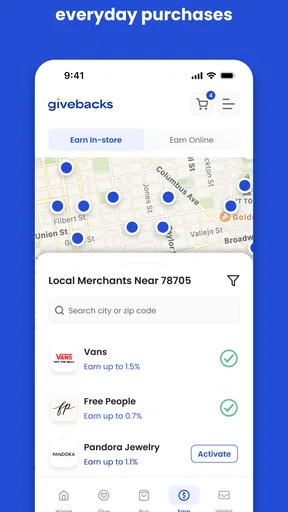
Another common stumbling block is assuming that every purchase will automatically count. The safest habit is to check the current instructions attached to the shopping opportunity before buying. Availability can depend on the participating merchant, the route you use to shop, and the action the app asks you to take. Givebacks is most useful when you treat those steps as part of the purchase rather than as optional background information.
That may sound less convenient than using a normal retailer app, and in one important sense it is. A standard shopping app is designed to minimize decisions between search and payment. Givebacks adds a community-support purpose, so the user may need to pay more attention to eligibility and attribution. The trade-off is meaningful for families who want school support tied to ordinary spending, but less attractive to someone who only wants the fastest checkout.
What to check before creating a routine
I recommend starting with one small, familiar purchase rather than planning a large shopping session around the app. This gives you a chance to understand how the selected school appears, where the shopping instructions are shown, and what confirmation looks like. A modest first test is also easier to troubleshoot if something does not appear as expected.
Keep the school’s exact name in mind when making your selection. Schools can have similar names, and a rushed choice is the kind of mistake that is difficult to notice later. If the app presents a confirmation step, read it carefully and save a mental note of what you selected. This is a practical safeguard, not an accusation that the app is unreliable.
It also helps to decide who in the household will manage the activity. If one parent starts the setup and another later shops, confusion can arise over which account, school, or shopping path is being used. Givebacks works better when the family agrees on one simple routine: choose the school, review the current opportunity, complete the required shopping action, and check the result afterward.
The app is free and rated for Everyone, which makes it approachable for families rather than a specialist fundraising tool. Still, “free” does not mean there is no effort involved. Your time is the real cost: reading the instructions, remembering the correct route, and verifying that the activity was connected properly. For occasional shoppers, that effort may outweigh the benefit. For families already making eligible purchases, it can be easier to justify.
Setup checks that prevent avoidable confusion
Before blaming the app, I would run through a short preparation routine. Make sure the device is using a supported operating system; the listed minimum is Android 7.0. Then open the app with a stable connection, allow screens to finish loading, and avoid switching repeatedly between apps while completing the initial setup.
Next, confirm the basics in this order:
- Choose the intended school or organization carefully.
- Read the shopping instructions attached to the available option.
- Check whether the action must begin inside Givebacks.
- Complete the purchase or visit without changing the route unnecessarily.
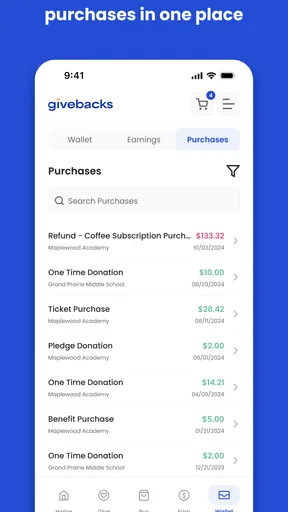
- Return to the app and look for the relevant confirmation or status.
This sequence is useful because it separates two questions that people often combine: “Did I shop with the right merchant?” and “Did the app receive credit for the shopping activity?” A purchase can be valid in ordinary retail terms while still not being connected to the school-support flow if a required step was skipped.
Do not rely on memory when an offer or instruction has several conditions. I would read it immediately before starting, especially if you have used Givebacks before. Shopping programs can change their presentation, and a familiar-looking screen may still require a different action. The practical rule is simple: follow what the current screen says, not what you remember from a previous visit.
There is also a useful household trick here. If several people shop for the same school, agree on a shared note containing the school name and the basic sequence to follow. Do not share private login information; just make the process consistent. This avoids the situation where one person believes the purchase was connected while another used a different path entirely.
Recovering when a shopping action does not appear
If a completed activity is not visible right away, resist the urge to repeat the purchase immediately. First, reopen the relevant area, check the school selection, and review the instructions again. Closing and reopening the app can clear a temporary display problem, while a stable connection can help if the original screen did not finish loading.
Then reconstruct what happened in order. Did you start from Givebacks? Did you leave the app before completing the required step? Did you switch accounts, merchants, or browser screens? Did the shopping action actually match the opportunity you selected? Writing down the sequence makes it easier to identify a missed instruction instead of treating every problem as a technical failure.
If the app shows a status or confirmation, take note of it before trying anything else. A screenshot can be useful for your own records when the screen contains a school selection or transaction reference. I would avoid sending unnecessary personal or payment details to anyone while troubleshooting. Keep any support conversation focused on the app state, the selected school, and the general shopping step.
When a restart does not help, the sensible next move is to use the app’s available support route and describe the problem plainly. Include the device type, the app version, the school selected, and the point where the process stopped, but do not include passwords or complete payment information. The current version listed for Givebacks is 3.6.7, so checking whether your installation is current is also worthwhile before assuming the issue is permanent.
A useful recovery principle is not to create duplicate activity while uncertain. Repeating a purchase or switching rapidly between several shopping routes can make the situation harder to understand. One careful test, followed by a clear record of what happened, is usually more productive than several rushed attempts.
When the app is not the cause
Some apparent Givebacks problems are really shopping or account problems elsewhere. A merchant’s own checkout may fail, a payment may be declined, a browser session may expire, or a purchase may be canceled after authorization. In those cases, the app cannot repair the retailer’s transaction. Check whether the order itself completed before focusing on school attribution.
Likewise, an offer may not behave like a universal discount. School-support activity and personal savings are not always the same thing. If your main goal is the lowest possible price, a retailer’s app, a price-comparison service, or a coupon tool may be a better first choice. Givebacks makes more sense when supporting the school is part of the decision, even if another service is more specialized for finding bargains.
There is a similar distinction with privacy and convenience. I would not install it casually for a single purchase if I had no interest in supporting a participating school. The app earns its place when it becomes part of a deliberate family routine. Users who dislike linking shopping behavior with a community cause, or who prefer to keep every purchase inside one retailer’s app, may find the extra step unnecessary.
It is also worth considering the school itself. If the child changes schools, if the selected organization is wrong, or if the family is supporting several groups, carefully reviewing the active selection becomes essential. I would not assume that an old choice remains appropriate forever. Before a major shopping trip, verify the destination again so that the effort supports the group you actually intend to help.
For grandparents and relatives, Givebacks can be useful only if the instructions are easy to explain. A short, written routine works better than telling someone to “just use the app.” Explain which school to choose, where to begin the shopping action, and what confirmation to look for. If that explanation becomes complicated, a different family member may be better suited to manage the process centrally.
How it compares with ordinary shopping alternatives
Compared with a retailer’s own application, Givebacks is not the strongest choice for inventory depth, delivery management, or a familiar one-store checkout. The retailer app wins when you already know what you want and care about speed. Givebacks has a different advantage: it gives the shopping activity a school-support purpose rather than treating the order as a purely personal transaction.
Compared with coupon and cashback services, the decision is more personal. Those services often focus on individual savings or rewards, while Givebacks is centered on supporting a school. A cashback tool may be better if your priority is measurable personal return. Givebacks may be better if you are comfortable accepting a little more setup in exchange for directing value toward a school community.
Compared with offline school fundraisers, the app can fit more naturally into purchases you were already going to make. That is its most convincing use case. You do not need to organize an event or ask neighbors to buy something solely for fundraising. However, the app still requires attention at the point of shopping, so it is not completely passive. Families should choose it because the routine is manageable, not because they expect support to happen without checking anything.
A realistic family workflow
Imagine a parent preparing for a normal weekend: household supplies, a child’s school materials, and perhaps an online order already planned. Instead of opening several fundraising pages, the parent opens Givebacks, checks the intended school, reads the instructions for the relevant shopping opportunity, and begins from the required route. After finishing, the parent returns to the app and verifies the result.
The important detail is timing. The app should be checked before the purchase, not after. Looking afterward may tell you what happened, but it cannot always restore a missed attribution step. I would also avoid combining several unrelated purchases during the first attempt. One clearly understood transaction teaches the family more than a large, confusing batch.
Once the routine is familiar, another household member can follow it. The family can decide that one person handles school selection while each shopper checks the current instructions before buying. This division reduces accidental changes and makes Givebacks less intrusive. The app becomes a small checkpoint in the shopping process rather than a separate fundraising project.
Who should use it and who should skip it
I would recommend Givebacks to parents, guardians, and relatives who already shop with participating opportunities in mind and want those purchases to support a child’s school. It is especially suitable for people willing to spend a minute checking the route before they buy. The free price and Everyone rating also make it easy to try without committing money to the app itself.
I would be more cautious if you expect a complete shopping marketplace, automatic credit for every purchase, or a highly streamlined experience with no reading involved. That is not the role I would assign to this app. People who rarely shop through eligible opportunities, do not have a school or organization to support, or primarily want personal discounts may get more value from a retailer, coupon, or cashback alternative.
My overall impression is that Givebacks succeeds when its purpose matches the user’s priorities. It is not simply a faster way to buy something; it is a way to make selected shopping activity serve a school-support goal. The friction comes from needing to confirm the school and follow the correct path, but that friction is manageable when the family creates a repeatable routine.
Givebacks was released on March 25, 2022, and the developer is Givebacks, Inc. Its current version is 3.6.7, and the app remains free to use. Those details are less important than the practical test: can you complete one small shopping action, verify what happened, and repeat the process without confusion?
My practical verdict: I would keep Givebacks installed if school support is already part of my household’s shopping decisions and the setup works smoothly for the stores I use. I would not make it my main shopping app, and I would not assume every purchase counts without checking the instructions. Used as a deliberate bridge between everyday buying and school fundraising, it is worth trying; used as a replacement for a retailer or savings app, it is likely to disappoint.
In short, the best way to approach Givebacks is with modest expectations and a careful first test. Select the right school, follow the current shopping instructions, verify the result, and troubleshoot the sequence before blaming the technology. If that process fits your routine, the app offers a practical way to turn eligible shopping into community support.
Verdict
Strengths of Givebacks
- Simple way to discover and support local charitable campaigns.
- Clear contribution tracking helps users monitor their giving activity.
- Convenient mobile access makes donating possible from almost anywhere.
- Campaign updates can help donors stay connected with supported causes.
- Useful option for users seeking community-focused giving opportunities.
Limitations of Givebacks
- Available campaigns may vary considerably depending on your location.
- Some features may require creating an account and sharing personal details.
- Donation options and payment methods may not suit every user.
- Campaign information can depend on updates provided by organizers.
- The app’s usefulness may be limited in areas with few active campaigns.
Similar Picks in This Category
View All
SHEIN-Shopping Online
Roadget Business PTE. LTD.4.8

Amazon Shopping
Amazon Mobile LLC4.4


Mercado Libre: Compras online
Mercado Libre4.8

Wish: Shop and Save
Wish US Holdings LLC4.7

Alibaba.com - B2B marketplace
Alibaba Mobile4.4
Frequently Asked Questions
What is Givebacks and how does it work?
Givebacks is a fundraising and community-support platform designed to help organizations, schools, teams, and groups raise money through purchases and shared campaigns. After creating or joining a participating group, users can browse available offers, shop through the app or connected partners, and generate contributions for their selected organization. The exact earning process, available merchants, and reward amounts may vary by campaign and location.
Is Givebacks free to download and use?
The Givebacks app is generally free to download, and users can usually create an account or participate in a group without paying a separate membership fee. However, the products or services purchased through participating offers still have their own prices, taxes, shipping charges, and possible restrictions. Before completing a transaction, review the offer details carefully to understand whether any fees or exclusions apply.
How do I support a school, team, or organization through Givebacks?
To support an organization, you typically need to find its campaign or invitation inside Givebacks and connect your account to the appropriate group. Once enrolled, eligible purchases or activities may generate funds for that organization. Make sure you select the correct group before shopping, because contributions may not be transferable later. Some campaigns can also provide a shareable link for inviting family and friends.
Does Givebacks require my personal or payment information?
Givebacks may request basic information such as your name, email address, location, or group affiliation to create an account and provide relevant campaign features. Payment details may be needed when you purchase products or services through the platform or a linked merchant. Before registering, check the app’s privacy policy and permissions, and avoid entering sensitive information unless it is clearly required for the feature you are using.
Are Givebacks offers and fundraising rewards available everywhere?
Availability can depend on your country, state, participating merchants, campaign rules, and the organization using the platform. Some offers may be limited by location, purchase date, product category, or promotional period. If you are downloading Givebacks from outside the main supported regions, confirm that local campaigns and payment options are available. Reading each offer’s terms is important, since not every purchase will necessarily qualify for a contribution.
